


Lognexa
4.457.00 Reviews
App Specs
- Version
- 1.0.3
- Updated On
- License
- Free
- Downloads
- 1,000,000+
- Developer
- APPDUB DIGITAL
- Categories
- Parenting
- Platform
- Android
Screenshots
 Analysis by AppCompare
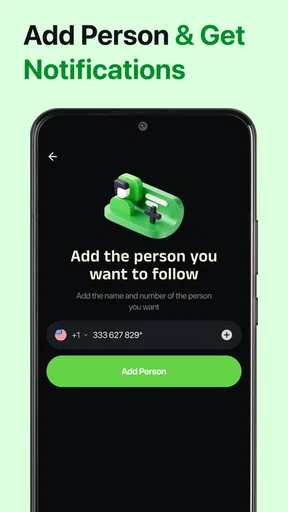
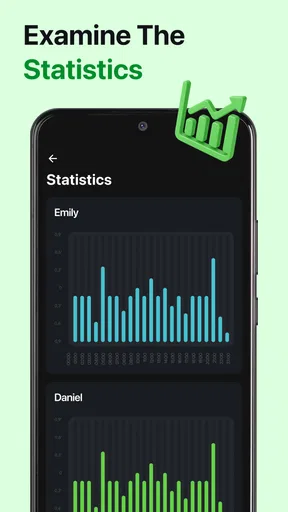
I find a screen-time tool most useful when it helps me notice a pattern, not when it turns every minute into a score to chase. Lognexa is built around that kind of reflection: it lets you log your online time, compare it with friends, and think about whether your digital habits feel balanced. That makes it more relevant to parents who want to talk about technology use than to anyone looking for a full parental-control system.
As a parenting app from APPDUB DIGITAL, Lognexa has a clear, focused premise. It is free to install, rated for Everyone, and has an average rating of 4.6 from around 81,000 ratings, with over 500,000 installs. The current version is 1.0.3, and optional in-app purchases range from $3.99 to $9.99 per item. Those purchases are worth keeping in mind if you are choosing a tool for a whole household: decide what you actually need before paying for anything.
Building a useful baseline
I would start by using Lognexa as a shared observation tool rather than introducing it as a way to police a child. Pick a normal stretch of days and log online time as honestly as possible. The point is to establish what an ordinary week looks like before setting goals or changing routines. A baseline is more useful than a rushed judgment based on one unusually busy afternoon.
For a family, agree on what “online time” means in your conversations. A child may distinguish schoolwork, messaging relatives, games, and passive scrolling, while a parent may initially lump them all together. Even when the app’s log is simple, deciding what you want to learn from it can make the exercise fairer. Ask whether the concern is bedtime, interruptions during homework, or simply a sense that phones are taking over shared time.
A realistic routine might be a brief check-in after dinner: look at the day, compare it with the family’s expectations, and choose one small adjustment for tomorrow. If the issue is late-night use, the conversation can focus on charging devices outside bedrooms; if it is homework distraction, agree on a phone-free work period. The log is a prompt for that discussion, not proof that a child has behaved badly.
Settings and ground rules worth checking
Before relying on any tracking routine, I would look through the app’s available settings and decide what information the family is comfortable recording or sharing. Keep the setup proportional: if the goal is to understand broad habits, avoid turning check-ins into minute-by-minute audits. A tool that creates arguments over small discrepancies can undermine the balance it is meant to support.
The friend-comparison element needs particular care in a parenting context. Comparing habits can make a pattern easier to discuss, but it can also turn screen time into a competition or invite embarrassment. I would use comparisons only with people who understand the purpose, and I would frame them as context rather than a target. A friend’s routine is not automatically right for your child, especially when school, hobbies, or family rules differ.
Worth Reading Before You Choose

Flipboard Shows What News Apps Must Do Beyond the Feed

Switching to Android Auto Means Rethinking Your Driving Routine

Google Calendar Makes a Crowded Week Easier to Manage

Ludo King Makes the Most of the Minutes Between Plans

Baby Panda World Brings Quick Play to Modern Phones, but Its Game Library Feels Busy

ESPN’s Live Game View Makes Following Close Games Easier
Parents should also make the boundaries explicit before a child starts logging: who will see the information, when it will be discussed, and what will happen if a day looks different from usual. That clarity matters more than a strict number. It helps a child understand that the goal is better judgment and healthier routines, not secret monitoring or punishment.
Make the habit easy to repeat
The strongest workflow is likely the one your family can keep doing without much effort. Attach a short review to something that already happens, such as the end of homework or the evening wind-down. A recurring moment is easier to remember than a separate daily task, and it makes the app a small part of a conversation rather than another chore.
I would also avoid reacting to every individual entry. Review the general pattern after several ordinary days, then choose one change at a time. For example, if the log suggests that online time is drifting later, try moving the charging spot for a week before adding several new restrictions. If the problem is fragmented homework, test one defined focus period and see whether it feels workable. This keeps the family’s response tied to a specific issue.
There is a useful distinction between logging and enforcement. Lognexa can support awareness and comparison, but parents who need device-level blocking, app-specific limits, location tools, or detailed controls should check whether a dedicated parental-control option better fits the job. Likewise, a built-in screen-time dashboard may be more convenient for someone who only wants basic device totals and does not care about a separate logging habit or friend comparisons.
Where this approach can fall short
A manual or routine-based log depends on people entering information consistently. If family members skip entries, record different kinds of activity, or interpret “online time” differently, comparisons become less meaningful. I would treat gaps as a sign to simplify the process, not as evidence of dishonesty. A lightweight habit is better than a meticulous system that no one wants to maintain.
Another limitation is that a time total cannot explain what someone was doing or why. A long session might be a video call with a relative, school research, creative work, or endless scrolling; those situations deserve different responses. That is why I would pair the record with a calm question about context instead of assuming that less time is always better. Families seeking automatic, detailed oversight may find this approach too hands-on.
It is also not the right fit for every age or household dynamic. A younger child may need clear parent-led routines more than peer comparison, while a teenager may respond better when they help choose the goals and decide what information to share. If tracking itself becomes a source of conflict, pause and revisit the family agreement before continuing. The app is most useful when everyone sees a reasonable purpose in using it.
A practical verdict for parents
Lognexa makes the most sense for families who want a shared way to reflect on online habits and are willing to build a simple, repeatable check-in around it. Its focus on logging and comparing time gives parents a conversation starter, but the value comes from how thoughtfully the family uses that information. I would not choose it as a substitute for device restrictions or as a way to supervise every online action.
For a parent and child who can agree on what they are tracking, a short evening review can turn vague concern into a specific, manageable experiment. For a household that wants automatic controls or sees comparison as pressure, a device’s built-in tools or a more comprehensive parental-control app may be a better match. My recommendation is to begin with a modest goal, keep the discussion private and nonjudgmental, and continue only if the routine genuinely helps.
Have you ever found yourself juggling multiple tasks, appointments, and projects, only to realize you’ve missed a critical deadline or forgotten an important meeting? Trust me, we’ve all been there. Enter Lognexa, the app that promises to turn your chaotic schedule into a streamlined masterpiece. Let’s dive into what makes this app a potential game-changer for productivity seekers like us.
Getting Started with Lognexa
First things first, downloading Lognexa is a breeze. Available on both Android and iOS, it took me less than a minute to get it up and running. The app greets you with a clean, intuitive interface that’s easy to navigate. No clutter, no unnecessary frills—just what you need to get started right away. After a quick sign-up process, you’re ready to explore its features.
Features that Stand Out
Once inside, the first thing you’ll notice is how Lognexa focuses on organization. The app offers a robust calendar feature, allowing you to seamlessly integrate your personal and professional schedules. The drag-and-drop functionality makes it super easy to rearrange events without breaking a sweat.
But what truly caught my attention was the task management system. Using a combination of lists, tags, and deadlines, you can prioritize tasks efficiently. The reminders feature ensures you don’t miss anything important, sending you notifications that are both timely and customizable.
Collaboration Made Easy
If you’re someone who works in a team setting, you’ll love how Lognexa handles collaboration. The app allows you to share tasks and calendars with team members, making it straightforward to coordinate projects. The real-time updates are a lifesaver, keeping everyone on the same page without endless email threads.
Moreover, the integration with popular apps like Google Calendar and Slack means you won’t have to overhaul your existing workflow. Instead, Lognexa fits right in, enhancing your productivity without demanding too much adjustment.
Customization and User Experience
One of the things I appreciate about Lognexa is its level of customization. You can tailor the app to fit your specific needs, whether you prefer a minimalistic style or a more detailed view. The night mode option is a sweet bonus, perfect for late-night work sessions.
The user experience is generally smooth, with quick response times and no noticeable lag. The developers clearly put effort into ensuring the app runs efficiently, which is crucial for maintaining productivity.
What Could Be Improved?
While Lognexa offers an impressive suite of features, there are a couple of areas where it could improve. For instance, I noticed that the initial setup of integrations can be a bit tedious. Some users might find the learning curve steep, especially if they are not tech-savvy.
Additionally, though the app is largely glitch-free, there were moments when syncing with external calendars took longer than expected. It’s not a dealbreaker by any means, but something to be aware of if you’re on a tight schedule.
Final Thoughts
Overall, Lognexa is a powerful tool for anyone looking to boost their productivity. Its combination of task management, calendar integration, and team collaboration features make it a versatile app for both personal and professional use. Despite a few areas for improvement, its strengths far outweigh its weaknesses.
So, if you’re ready to take control of your time and tasks, give Lognexa a try. I found it to be a reliable companion in the quest for better organization, and I’m betting you will too.
Pros
- User-friendly interface for easy navigation.
- Customizable features enhance user experience.
- Reliable performance with minimal crashes.
- Regular updates with new functionalities.
- Excellent customer support available.
Cons
- Limited free version with basic features.
- Occasional slow loading times reported.
- Some features require in-app purchases.
- Interface can be overwhelming for newbies.
- High battery usage during prolonged use.
FAQs for Lognexa
What is Lognexa and what features does it offer?
Lognexa is a comprehensive logistics management app designed to streamline operations for businesses. It offers features like real-time tracking, inventory management, automated scheduling, and detailed analytics. The app is suitable for small to large enterprises looking to enhance efficiency and ensure timely deliveries.
Is Lognexa available on both Android and iOS platforms?
Yes, Lognexa is available for download on both Android and iOS devices. You can find it on the Google Play Store for Android users and the Apple App Store for iOS users, ensuring accessibility across different devices and operating systems.
How user-friendly is Lognexa for new users?
Lognexa is designed with an intuitive interface that is user-friendly, making it easy for new users to navigate. It includes tutorials and support options to help users get accustomed to its features quickly, ensuring a smooth onboarding process without steep learning curves.
Does Lognexa offer any customer support or training resources?
Yes, Lognexa provides robust customer support through various channels, including email and live chat. Additionally, the app offers training resources such as video tutorials and documentation to help users effectively utilize all its features and functionalities.
Are there any subscription fees or in-app purchases in Lognexa?
Lognexa operates on a subscription model with various pricing tiers based on the level of service and features required. While downloading the app is free, premium features may require a subscription or in-app purchases, ensuring businesses can choose a plan that fits their needs and budget.


